DEPARTMENT SCHEDULING GUIDES
Faculty Availability and Scheduling Preferences
Faculty requests are difficult to track through repeated timetable revisions. Register time restrictions and preferences as scheduling rules so they can be considered alongside the whole department’s timetable.
Separate unavailable times from preferred teaching times.
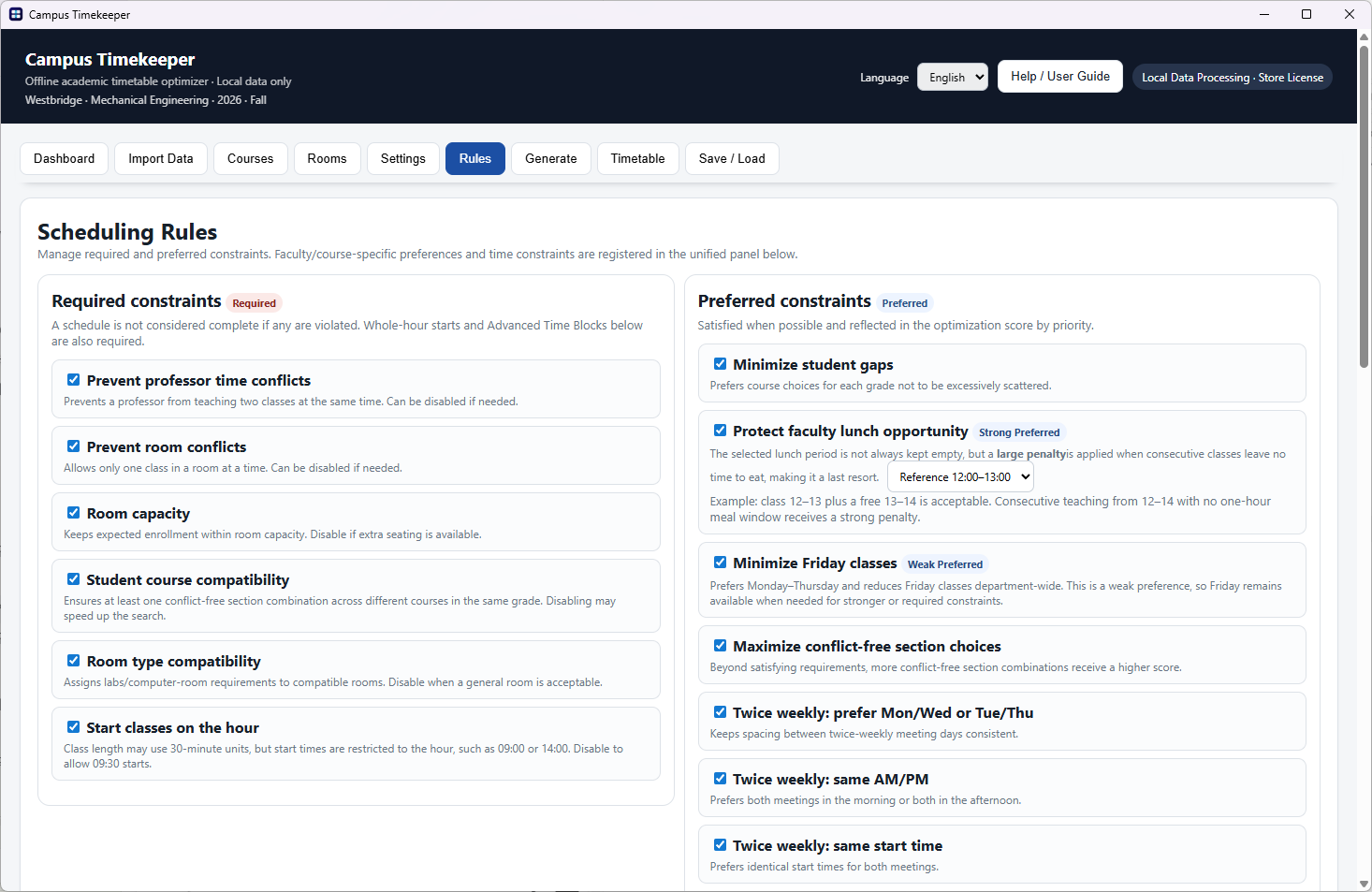
Treating every request as mandatory can make scheduling impossible.
A time when someone cannot teach is different from a time they simply prefer. Record genuine restrictions as hard constraints and flexible requests as soft preferences to make competing requirements easier to review.
How it works
- 01
Collect faculty requests
Distinguish unavailable times from preferred teaching days and hours.
- 02
Register hard restrictions
Add times that must remain free and review hard constraints such as preventing overlapping classes for the same faculty member.
- 03
Set soft preferences
Register flexible teaching-time and class-placement preferences. Their importance influences the optimization score.
- 04
Review the complete timetable
Check the generated assignments and any preferences that could not be met. Adjust the rules and regenerate when needed.
A preference is a priority, not a guarantee.
If a faculty member cannot teach at a certain time but otherwise prefers mornings, record the restriction separately from the morning preference. Preferences are considered alongside other faculty, classrooms and hard constraints, so review their effect in the final result.
Frequently asked questions
How are hard and soft constraints different?
A valid timetable must satisfy its hard constraints. Soft preferences guide optimization but may not all be satisfied.
Can I prevent overlapping courses for one faculty member?
Use the faculty conflict prevention constraint so the same faculty member is not assigned multiple classes at the same time.
What if no valid schedule is found?
Review required free times, teaching availability, room availability and teaching hours together. Check whether a flexible preference has accidentally been made mandatory.
Try it with your department’s data
Generate and export 3 timetables free
Each free use includes one timetable generation and export of that result. You get 3 such uses in total. Continue with an annual subscription at ₩599,000 (KRW). Prices vary by country or region in accordance with Microsoft Store pricing policies. Check your local Microsoft Store for the applicable price.
Now available on Microsoft Store
Install free from Microsoft StoreExplore your department’s workflow
University Timetable Generator
Automatically schedule university courses with faculty, sections, classrooms and department constraints. Review your timetable and export it with CampusTimekeeper.
Explore guideFrom Department Excel Files to an Automatic Timetable
Import your department’s course and classroom Excel data into CampusTimekeeper. Map columns, review the data and set constraints before generating a timetable.
Explore guide